

Magnasonic All-in-One 24MP Film Scanner with Large 5″ Display & HDMI, Converts 35mm/126/110/Super 8 Film & 135/126/110 Slides into Digital Photos, Built-in Memory (FS71)
$129.98




Price: $129.98
(as of Jan 14, 2026 06:11:23 UTC – Details)
From the brand


At Magnasonic, our mission has been a simple one since 1954 – create people-driven products that make life’s daily adventures easier and more fun. We believe everyday experiences should be extraordinary.

Ultrasonic Jewelry Cleaner
Our Ultrasonic Jewelry Cleaners will restore your valuables to their former glory! Great for business, commercial, or home use.

Film Scanners
Rediscover your precious captured memories with our unique selection of all-in-one Film Scanners. Make digital copies of your old film.

Clock Radios
Whether you need dual alarms for you and your partner or need to project the time on your wall or ceiling, our Alarm Clocks are for you
Best Sellers
How did we get our start?
Founded in 1954, Magnasonic has been a leader in developing innovative consumer electronics.
What makes our products unique?
We create people-driven products that make life’s daily adventures easier and more fun.
Why do we love what we do?
We have a fanatical obsession with developing products that make everyday experiences more exciting. We are dedicated to empowering people with simple and stylish products with superior quality.
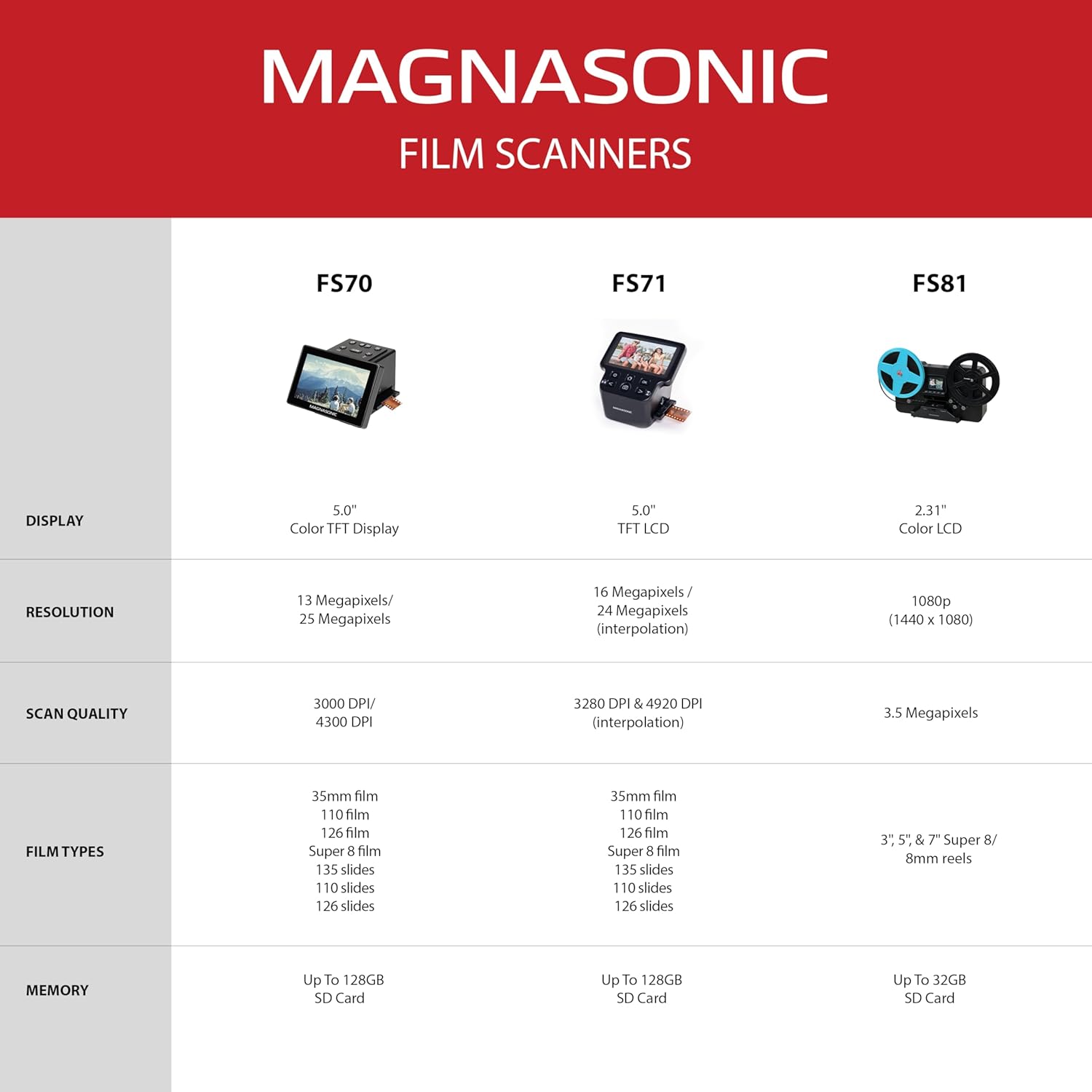
PRESERVE OLD MEMORIES – Quickly and easily converts 35mm/110/126/Super 8 film negatives & 135/126/110 slides into high resolution 24MP digital JPEG files
MULTIPLE WAYS TO VIEW – Using the stunning 5” LCD screen, view your film, slides & scanned images directly on the scanner or use an HDMI cable (not included) to view on your TV or monitor
BUILT-IN MEMORY & SD CARD SLOT – With a convenient 128MB internal memory and an SD card slot for up to 128GB of expandable memory you’ll be able to scan and save a lifetime of photos
NO COMPUTER NEEDED – No complicated or expensive photo-editing software or driver installation required, you can adjust brightness, RGB color correction, flip and mirror directly on the scanner
FAST & EASY SCANNING – Simple setup for frustration-free operation to effortlessly scan your photos in less than 5 seconds each with the included fast-loading film trays
11 reviews for Magnasonic All-in-One 24MP Film Scanner with Large 5″ Display & HDMI, Converts 35mm/126/110/Super 8 Film & 135/126/110 Slides into Digital Photos, Built-in Memory (FS71)
Add a review
Related Products
![[Electric Focus&Android OS] Mini Projector with WiFi and Bluetooth, XuanPad 4K 1080P Support Portable Projector, 210°Rotatable Stand, Built-in 8000+APPS, Dust Removal and Heat Dissipation Design](https://i1.wp.com/m.media-amazon.com/images/I/61JOg263fHL._AC_SL1500_.jpg?w=300&resize=300,300&ssl=1)


$129.98
Mary Connelly –
A great choice
Can’t recommend highly enough!! I looked through a ton of similar models and am thrilled with this one. It has done a great job on my grandpa’s 135mm slides from 1940s-1970s. It’s been awesome to have the option to digitize negative film also! Very user friendly and dependable for a great price
Ajedi32 –
Nothing special, but does the job
We’ve been using this to scan old photo negatives for a couple months now, slowly working through our collection of old photos. It works quite well; easy to use, way cheaper than a mail-in photo scanning service, and good quality. You can easily see the film grain on scanned negatives if you zoom in, and I have no complaints about color accuracy, blurriness, or other image quality issues.As for the product overall, so far I only have a few minor complaints. The biggest one is that there doesn’t appear to be any way to set the date on images as you scan them. This is a pain because it means we have to go back and forth, transferring images to the computer and setting their date there for each album we scan. It would be really hard to remember which pictures were taken on which dates if we scanned multiple items and had to fix them all at once later, and leaving an incorrect date set in the photo metadata would make organization a huge mess. (Imagine scrolling through your camera reel in Google Photos, and suddenly coming across 2000 pictures all on the same, incorrect date. That’d be super annoying.)Another issue is that the film adapter had some plastic ridges on the inside that kept getting caught on the (slightly bent) film as we scanned it, preventing us from inserting the strip more than a few inches. I was able to solve that by filing down the plastic in the offending areas, but it was an annoying design flaw nonetheless.Another thing to note is that this scanner does crop off small portions of the negatives as you scan them. It’s not a big deal because you can see what’s getting cropped off and adjust the position before you save the photo, but for those deeply concerned about preserving all available information that might be an issue.
socca_dad –
Easy to use and does a great job. Purchase an SD card to do bulk transfers to your computer.
Does the job nicely. It’s quick and pretty accurate. It does cut off a little bit of the 35mm slide but not enough to make much difference. Transferring the images to my Mac is easy and quick. The internal memory only holds around 15 images but after transferring them it’s easy to delete the memory and start again. I wouldn’t use it much for editing the images. Just transfer to your computer and use your editing software for that. The only quirk I noticed is that when a slide is very dark, the screen flickers like it’s about to crap out but once you remove that slide everything goes back to normal. This probably isn’t for a professional but it’s great for average home use to convert your slides.
Painted_life –
Great scanner
This thing rocks! I could not believe the quality of picture it gave from 57 year old negatives and slides!!! The color accuracy of the photos were as of just taken today! It was super easy to scan. No noise. Power source it’s plug in. Very portable and great value for the money. I scanned over 600 images. This is a keeper for me.
stevefranz –
Good scanner, modest learning curve.
I would like to give this scanner a 5 star rating, but there are a number of issues with it that will downgrade it for someone who is fairly picky with their scans.Pro:Very fast, easy to use. Slide the film in and move it from one picture to the next.With a good negative, the scans are crisp and clear.The menu makes it relatively easy to adjust the overall brightness and color tint.The included cleaner makes quick work of any dust particles.With the USB setting, transferring files to the computer for storage is very fast & easyCon:You don’t get a full scan, there is always some cropping.If the negative is thin, the lighting can be uneven, brighter on the edges than the center – plus colors are off on the edges.On a thin negative with little detail, the scan is orange, you have to do some fiddling to get decent color.It would be nice to be able to scan directly into the computer.
LDub –
Easy to use, negatives to digital images in seconds – good quality – well worth it
This is the third film to digital scanner I’ve purchased, and it is the best. The others worked, but not easily and I always had problems. This unit has a nice display to show you where your alignment is and it captures good quality images from the slides. It is a nice size, not too big, not too small. You’ll need to remember to check for dust and clean it, but that is simple with the supplied cleaning stick (or a can of compressed “air”). I highly recommend this unit for home users – professionals may have different standards, but it certainly would work for their proof sets.
HWrede –
Ich habe den Scanner gekauft, um meine über 2000 Negative aus meiner Jugend zu digitalsieren. Ich habe damals mit 15 hauptsächlich in Schwarz/Weiss fotografiert, alles selbst in den gängigen Lösungen (hauptsächlich in Microphen) entwickelt, vergrössert und mich gefreut. Dann haben die ganzen Schätze über Jahrzehnte im Keller gelagert. Ich suchte nach einer schnellen, halbwegs zufriedenstellenden Möglichkeit mit überschaubarem Aufwand die ganze Sache zu digitalisieren. Und: ich bin vollkommen zufrieden. Ja, es geht besser. Aber dann wirds richtig teuer. Dieser Scanner mit ein wenig Nachbearbeitung in Photoshop erzielt wirklich gute Ergebnisse im privaten Bereich. Nachbearbeitung ist notwendig, aber dann sind die Ergebnisse für den überschaubaren finanziellen Aufwand wirklich gut
A. Hadley –
This is an excellent product, easy to set up and use, with great results. I had previously tried scanning old slides with an Ion “slides forever” device, but the quality was terrible because of low resolution. This Magnasonic is more expensive but there’s no contest when it comes to quality. The resulting images are clear and bright. You have to feed slides manually but it’s quick and easy – each slide pushes the previous one out the other side. Exposure or colour can be adjusted when (rarely) needed, though not in detail. The device has a very small internal memory so it’s advisable to buy some standard SD cards for bulk processing. Important note: it will only work with lower capacity cards – 2GB recommended (which will hold a few hundred images). Files can be transferred to computer via card reader or direct from the device. No software needed.
ヨッスィー –
高解像度は期待しない事〰️✨あくまでも大量のフィルムから必要なモノをチョイスし軽い気持ちで電子化する用と考える❗
Attique A. –
Very good item, highly recommended.
Stephen B –
I purchased this scanner a week ago and I have digitized well over 500 35mm slides so far. In summary, this is a great scanner for scanning 35mm slides. It’s easy to use and the image quality is good.The scanner comes with a 5V, 1A USB wall adapter, but if your end goal is to upload images to a PC you can leave the scanner connected to your PC’s USB port. I typically capture a batch of images to the scanner’s memory, upload to the PC, delete the images stored in the scanner and start again. I installed a 32GB SD card since the scanner’s 128MB internal memory only holds about 50 images. Captured images are named “PICTxxxx.JPG” so if you want to keep images organized by event, date, etc. you’ll need to work in batches. I wish there was an option to capture directly to the PC, where captured images could be renamed or tagged on the fly.The 35mm slide adapter makes easy work of continuously feeding and capturing slides. I found that the best way is to have three slides in the adapter – one infeed, one outfeed and the middle slide being scanned. Pushing on the infeed and outfeed slides allows you to shift the middle slide back and forth to ensure it is perfectly centered before hitting the “Capture” button.If your goal is to scan negatives, watch out! I tried scanning some 35mm negatives, but the film catches on the adapter outfeed slot and does not feed through. The plastic adapter has a slight step at the outfeed slot that catches the film. This is likely a molding defect, but it completely kills this feature.The images on the built-in 5in LCD screen look good, but to really see detail I suggest connecting a PC monitor via the HDMI port. The addition detail visible on an external monitor allows you to ensure the slide is centered and you’re not capturing the edge of the slide frame. Even so, be prepared to do a lot of digital cropping to get rid of the occasional edge artifact.On an external monitor the image sensor gaussian noise is noticeable. I was disappointed to see this, but it is not really a problem, just an opportunity for improvement.The resolution spec. is misleading. The sensor is a 16Mp sensor (4920×3280). The scanner is spec’d at 24Mp, but this is achieved with interpolation. Pixel interpolation does not necessarily mean better image quality, but it guarantees a larger file size. I’ll let the marketeers debate image quality, but I did not see any significant difference, so I set the resolution to 16Mp (about 3Mp per JPG image) and left it there.Once I established how to orient the slides, I did not need to use the vertical or horizontal flip buttons. The most common adjustment I needed to make was the brightness, and this is easy to do with just a few button clicks. Brightness adjustment just ensures no part of the image is saturating. After that, any remaining adjustments (tint, contrast, etc.) require image editing software on a PC.The cleaning tool works brilliantly. Thankfully my slides are relatively clean, but it was very easy to clean the occasional bit of dust that landed on the scanner’s illumination pane..Overall, this scanner is easy to use and works exactly as described. I am happy with this purchase.